
How To Link Your Universal Orlando Tickets To The Universal App
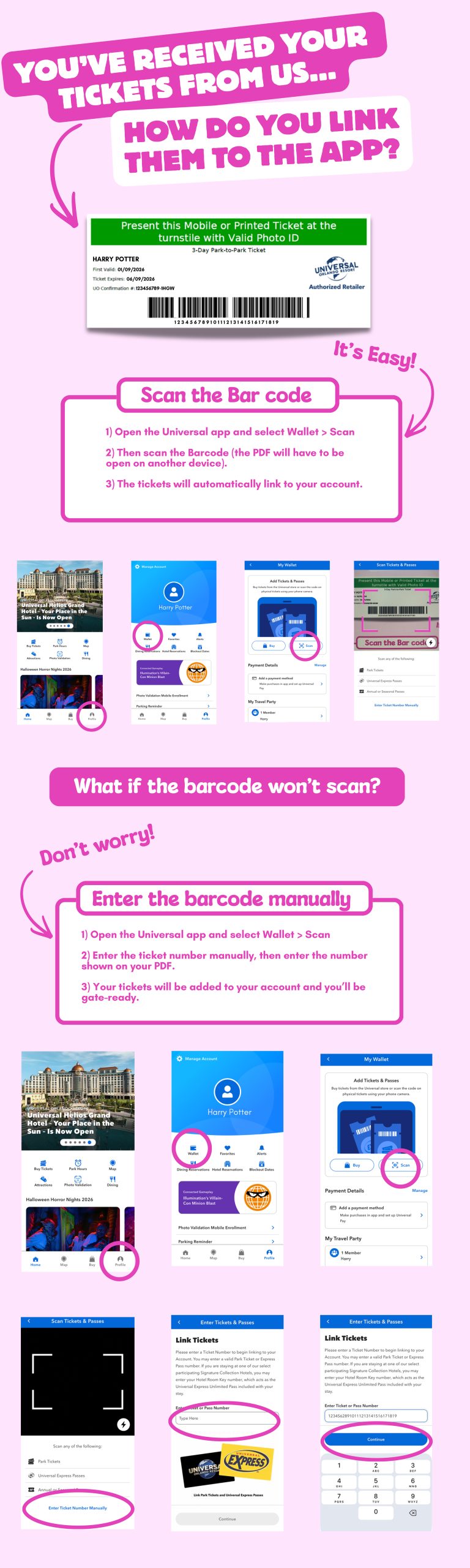
Watch this video to understand how to link your Universal Orlando Tickets to the Universal App!
Option 1: Scan the QR Code
- Open the Universal app and select Wallet > Scan
- Then scan the QR code (the PDF must be open on another device).
- The tickets will automatically link to your account.
Option 2: Enter the Ticket Number Manually
- Open the Universal app and select Wallet > Scan
- Enter the ticket number manually, then enter the number shown on your PDF.
- Your tickets will be added to your account and you’ll be gate-ready.